
A polished pentest report can still leave your organization exposed. The clearest signs of a bad pentest report include findings without reproducible evidence, vague scope, severity ratings that don’t reflect real risk, and remediation advice too generic to act on. A report with no findings isn’t automatically proof of a weak test, but it should explain what was tested and how the assessment reached that conclusion.
You’re right to look beyond the number of findings. A useful report shows what an attacker could achieve, why it matters to your business, and what to fix first. Without that context, even a long list of vulnerabilities can leave decision-makers and engineers guessing.
This guide explains how to assess a report’s findings, evidence, scope, methodology, and remediation advice. You’ll also find practical questions to ask about the testing work, the testers, and how fixes can be validated. The goal is to distinguish a report that supports real security decisions from one that only looks complete.
Key Takeaways
- Judge a clean result by the scope, testing approach, and evidence behind it, not by the absence of findings alone.
- Look for an executive summary that connects technical issues to business impact and helps decision-makers prioritize risk.
- Use remediation advice to identify practical fixes, address root causes, and set a clear order for action.
- Assess whether the report explains what was tested, what was out of scope, and how findings can be reproduced.
- Ask the vendor about tester experience, a findings readout, and retesting to validate fixes.
1. Is finding no vulnerabilities a red flag?
A report with no vulnerabilities isn’t automatically a red flag. It becomes concerning when it gives no clear account of the assets tested, techniques attempted, or limitations encountered. One of the signs of a bad pentest report is a clean result with no evidence to support its conclusion. Look for a defined scope, a record of testing activity, and a clear explanation of why the results justify confidence.
How can a report distinguish exploitable vulnerabilities from false positives? It should show how the tester validated each finding, including the affected component, steps taken, and observed result. For example, a scanner alert shouldn’t appear as a confirmed vulnerability unless testing demonstrates the issue in the assessed environment.
Automated findings need human review. Raw scanner output can flag a version or configuration without establishing real-world impact. The report should remove duplicates, correct inaccurate alerts, and explain each retained finding in context. A vulnerability scan alone can also miss chained vulnerabilities, business logic flaws, and access-control bypasses that require an attacker to combine steps.
Technical detail must connect to business risk. An executive summary should explain how a finding could affect critical systems, customer data, or business operations. For example, say that a broken authorization check could expose another user’s records, rather than leaving stakeholders with a tool output or vulnerability label. Keep exploit steps and technical evidence in the detailed finding.
Severity should reflect demonstrated impact and exploitability, not an unexplained score. For a critical finding, the report should explain the escalation path and how promptly relevant stakeholders were alerted. A readout call gives technical teams and decision-makers a chance to clarify attack paths, business context, and remediation priorities. The report should record decisions and any unresolved questions from that discussion.
Standards mapping adds useful context when it supports the reader’s purpose. Findings may map to frameworks such as OWASP or relevant standards, including HIPAA, ISO/IEC 27001, and PCI DSS. A framework reference should identify the applicable control or category; it should not replace evidence, impact analysis, or specific recommendations. Compliance language alone doesn’t prove that testing reached the systems that matter.
A clean result is more credible when the report explains how testers challenged assumptions. For a web application, that could include attempts to access another account’s data or bypass a key workflow. The report should also identify areas that were out of scope or unreachable, since those limits affect what a “no findings” result means.
Finally, interpret a pentest as a snapshot of the tested environment and agreed scope. A point-in-time assessment and continuous testing versus an annual pentest address different testing cadences. The report should state the testing period and any material constraints, so leaders can judge the result accurately rather than treating a clean report as proof of permanent security.
2. Actionable recommendations and remediation
A useful finding turns a technical weakness into a fix an engineering team can implement. It should identify the affected component, explain the vulnerable condition, and provide remediation steps suited to that environment. For example, “update the server” is too broad. A stronger recommendation names the affected dependency or configuration and explains how the change addresses the vulnerability.
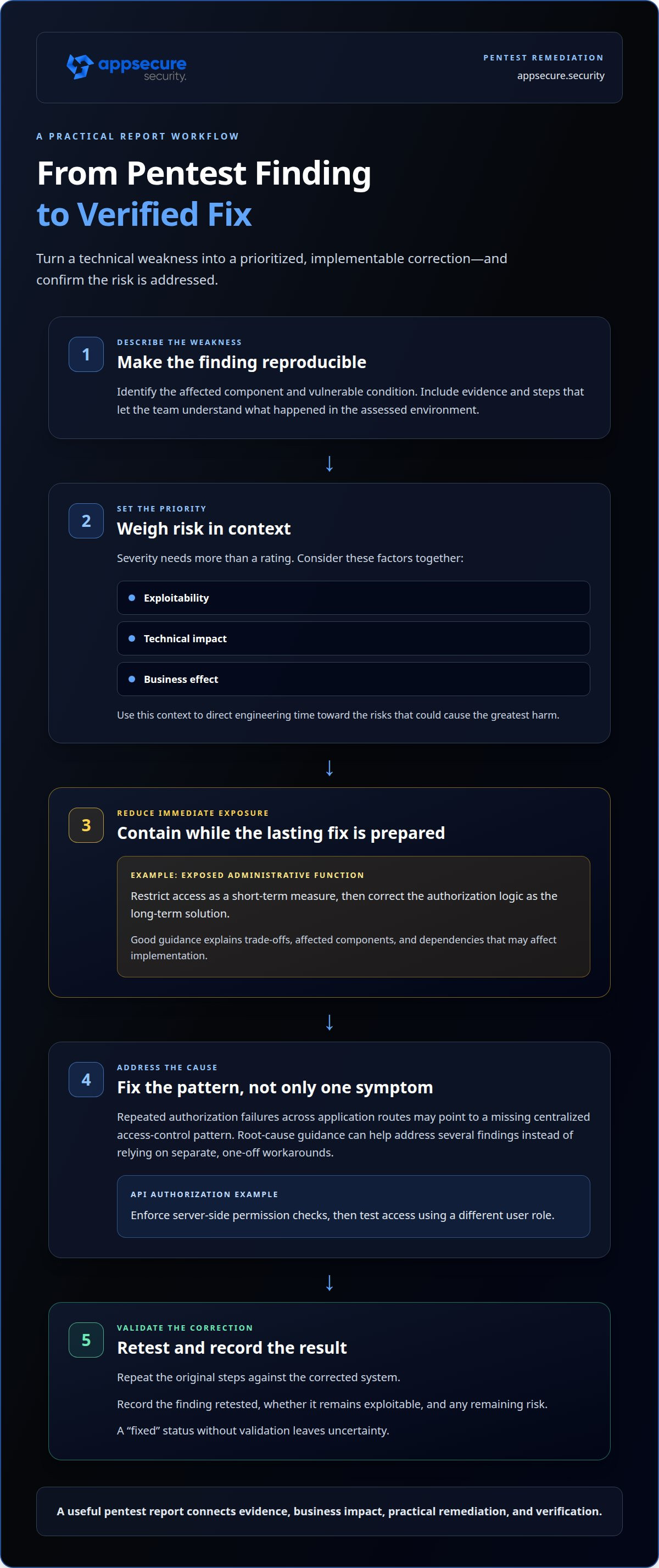
Recommendations should explain how to verify the correction, too. If a finding describes weak authorization in an API endpoint, the report can recommend enforcing server-side permission checks and testing access with a different user role. That gives engineers a concrete change and a way to confirm the flaw no longer exposes restricted data.
Prioritization needs more than a severity rating. The report should weigh exploitability, technical impact, and business effect together. A remotely exploitable issue that exposes sensitive records may demand faster action than a lower-impact weakness requiring extensive access. Leaders need this context to direct limited engineering time toward the risks that could cause the greatest harm.
Look for root-cause guidance when several findings point to the same underlying weakness. For example, repeated authorization failures across application routes may signal a missing centralized access-control pattern. Fixing that design issue can address several findings. A report that offers only separate, one-off workarounds may leave the same vulnerability class elsewhere.
Strong remediation advice distinguishes immediate containment from a lasting fix. For an exposed administrative function, the report might recommend restricting access as a short-term measure, then correcting authorization logic as the long-term solution. It should explain the trade-offs, affected components, and any dependencies that could affect implementation. Generic instructions such as “follow security best practices” don’t give a team enough direction to act.
Verification closes the loop. After remediation, retesting should repeat the original steps against the corrected system and record whether the vulnerability remains exploitable. The report or follow-up should identify the retested finding, the result, and any remaining risk. Retesting should validate specific fixes, not replace documenting them or become an entirely separate engagement.
A finding marked “fixed” without validation leaves uncertainty. If a code change blocks one attack path but another route still permits the same action, the underlying risk persists. Clear retest evidence helps technical teams close findings with confidence and gives leaders a defensible view of unresolved exposure.
If remediation guidance needs to connect more closely to your systems and development workflow, discuss your pentest findings with a security team.
3. Scope, rules of engagement, and methodology
A poor penetration test report leaves its target systems, objectives, or exclusions unclear. It also fails to explain which techniques were attempted, so readers can’t judge what the results cover.
Scope should identify the systems and assets included in the engagement. For a web application assessment, that may mean naming the application and relevant interfaces, such as its API. The report should distinguish tested assets from related systems that were excluded or unreachable. Without that boundary, an executive may mistake a limited assessment for broad coverage.
Objectives give the asset list purpose. A test focused on account access should explain whether testers examined authentication, authorization, and sensitive workflows. If the objective was to assess a particular attack path, the report should connect its methodology to that path. A generic statement that “security testing was performed” offers no way to judge the depth of the work.
Rules of engagement define how testing was conducted and where it stopped. The report should record relevant allowances and restrictions, such as approved test accounts, prohibited actions, or systems excluded from testing. These details help the client distinguish a deliberate boundary from a gap in execution. An excluded production interface, for example, remains outside the findings even if a connected system was assessed.
Methodology should describe the techniques attempted and how they relate to the objectives. If testers examined access controls, the report should explain which user roles or permissions they assessed. If a technique couldn’t be attempted, the report should state why. This helps technical teams understand what evidence supports each conclusion and lets executives interpret the result without overstating coverage.
Look for a clear account of limitations. A system may have been unreachable, credentials may not have worked, or a feature may have remained out of scope. Each limitation changes how readers should interpret the assessment. The report should identify the affected asset and explain the resulting coverage gap, rather than burying the information in general caveats.
Scope should reflect the client’s actual environment and objectives, not just a standard checklist. A modern attack surface may span connected applications and services, so context-driven testing can help determine what belongs in scope. The report still needs to state exactly what was included and excluded.
A defensible conclusion links scope, methods, and findings. If the report says no exploitable issue was found in a tested workflow, it should show what was examined and which constraints applied. That traceable chain helps teams decide whether to accept the result, address a limitation, or commission further testing.
4. Clean reports without evidence of testing effort
Common reporting mistakes include presenting raw scanner output as analysis, omitting supporting evidence, and making findings impossible to reproduce. A polished document can still leave readers unable to tell what the tester actually attempted. Look for evidence tied to each reported activity, not just a clean summary and a list of ratings.
For a reported issue, a test report should provide enough detail for another engineer to repeat the relevant steps and validate a fix. Useful evidence may include a request and response, a redacted screenshot, a command result, or an event log. Each artifact should connect to the affected system and finding. A screenshot without a caption or explanation may look convincing but can’t establish what action produced it.
Attack-path documentation should show how individual steps led to an outcome. For example, a report might record an initial access point, a privilege change, and the resulting access to a restricted resource. Include timestamps or sequence labels when they clarify the path. If the tester found or cracked credentials, the report should state the result without exposing reusable secrets.
Social-engineering evidence also needs measurable, clearly defined outcomes. A test report may record that 10 telephone contacts were made and 175 email addresses were compiled for a phishing exercise. Those details describe activity, but the report should also distinguish attempted contact from successful compromise. For example, record whether a user clicked, disclosed credentials, or enabled further access.
Keep evidence proportionate and safe to share. Redact passwords, tokens, personal information, and sensitive customer data while preserving the details needed to understand the finding. A useful appendix can hold supporting artifacts and lower-priority details. The main summary should guide executives to material risks, while technical teams can trace each claim to its evidence.
Professional formatting supports the review. Use consistent headings, finding identifiers, severity labels, and cross-references so readers can move from summary to technical detail without losing context. A clear table of contents and concise diagrams can help explain a multi-step attack path. Elaborate graphics aren’t necessary; consistent design and accurate captions matter more.
Proofreading is a security-reporting control, not decoration. A misspelled system name or inconsistent finding identifier can undermine confidence and slow remediation. Check that every finding has a matching evidence reference, that medium-severity issues are labeled consistently, and that screenshots remain legible after export. A final review should also confirm that appendices don’t contradict the executive summary.
Strong documentation lets technical teams reproduce findings and compliance reviewers understand the testing record. When a report contains conclusions without supporting artifacts, the links between the tester’s activity, evidence, and findings are missing. Address that gap before leaders rely on the document to assess exposure or track remediation.
5. Questions to ask penetration-testing vendors
Ask for a redacted sample report before agreeing to an engagement. Does its executive summary explain business impact, or just repeat technical ratings? Can an engineer follow a finding from evidence to remediation? A sample reveals whether the report format supports real decisions or merely produces polished pages.
Ask who will perform the penetration testing and who will review the findings. The report should identify the testers and describe their relevant experience. Ask how the team validates automated alerts, investigates business logic flaws, and records attack paths. Clear answers show whether testing moves beyond scanner output to assess what an attacker could actually achieve.
Ask how the team defines scope around your systems and objectives. For example, if the target includes a web application and its API, clarify whether both are assessed and how connected workflows are handled. Ask how exclusions, access limitations, and untested assets will appear in the final report. The answer should make coverage boundaries explicit.
Ask how severity ratings are determined and explained to different readers. A strong report gives executives a concise view of business exposure while giving engineers enough technical context to reproduce findings. Ask for an example showing how exploitability, impact, and recommendations are presented together. That reveals whether the report connects risk to action.
Ask how critical findings are escalated during testing. Who receives the alert, what information is shared, and how is the notification recorded? A critical weakness shouldn’t go unreported until the final document. Also ask whether the engagement includes a readout call, where testers can explain attack paths and help technical and business teams align on priorities.
Clarify how remediation is verified. Does the engagement include retesting fixes, and will the report document the result against each relevant finding? Ask how unresolved issues or partial fixes are recorded. This gives your team a clear way to distinguish closed vulnerabilities from risks that still need work.
Finally, ask for verifiable information about tester certifications and experience, along with a redacted sample report. Certifications alone don’t demonstrate the quality of a specific assessment, so examine the sample’s evidence, scope, and recommendations, too. Ask how the team adapts its methodology to your environment rather than relying on a fixed template. The answers should describe what happens before, during, and after testing.
Use these questions to surface gaps before testing begins. If you need a focused discussion about assessment scope and reporting, discuss your penetration-testing requirements.
AppSecure Security
AppSecure Security helps organizations reduce the risk of getting hacked with faster, in-depth pentesting at scale using AI agents. When a report leaves gaps in evidence, scope, or remediation guidance, a fresh assessment can clarify what was tested and where risk remains. AppSecure provides Web Application Penetration Testing, Mobile Application Penetration Testing, and API Penetration Testing. Its Agentic Penetration Testing Platform supports scalable, agentic assessments to help uncover security risks. The right approach depends on the systems and objectives under review. Findings should give technical teams clear evidence and decision-makers useful context, not just a polished document.
To discuss your testing needs, contact AppSecure Security.
Turn report findings into your next security decision
The signs of a bad pentest report matter most when they leave your team unable to decide what happens next. Treat the report as an operational input, not a file to archive. Assign an owner to each unresolved finding, connect remediation to the affected system, and track whether the fix changes the exposure. That process turns testing into actionable security work.
If the report’s conclusions don’t give you a clear basis for action, consider a fresh assessment focused on your systems and objectives. AppSecure Security provides penetration testing to help uncover technical risks and clarify what needs attention. The right next step is a precise view of your attack surface, backed by evidence your security and engineering teams can use.
Contact AppSecure Security to discuss your testing needs. Move forward with sharper insight and a stronger foundation for defending your organization.
Frequently Asked Questions
1. What is a Penetration Testing Report?
A penetration testing report is the written record of an authorized security assessment and its results. It helps technical teams plan work and gives decision-makers a basis for tracking risk. For organizations operating across India, the USA, the UK, Dubai, Canada, or Singapore, reports can distinguish findings by the systems and environments assessed, keeping each conclusion tied to the relevant deployment.
2. How can I tell if my pentest was actually a scan?
Check whether the report describes tester-led validation, not just detected software versions or configuration alerts. A scan may flag a suspected weakness; a penetration test should show how the tester examined its practical effect. For example, does the report document attempts to use different account roles or follow a workflow beyond the initial alert? A results table without testing activity or validated outcomes may indicate scan-heavy work.
3. Is finding no vulnerabilities a red flag?
Not by itself. A clean result can be credible if the assessment covered the agreed assets and the report explains its limits. Consider what changed after testing: a newly deployed login flow, a changed API permission, or a major release may create a different attack surface. Treat the report as evidence about the tested version, not a permanent statement about every future configuration.
4. What process red flags indicate a bad provider?
Watch for unclear authorization, no identified testing team, silence about serious discoveries, or unwillingness to discuss results with technical stakeholders. Another warning is a process that ends at report delivery, with no agreed way to clarify findings or validate fixes. Before an engagement begins, confirm who approves scope changes and who receives urgent notifications. Those answers can expose process gaps before testing starts.
5. What should a good report contain?
A strong report should make every finding trackable after delivery. Look for a unique reference for each issue, the affected asset, a clear risk explanation, supporting evidence, and practical remediation guidance. It should also show whether the finding remains open, has been fixed, or needs more work. For example, an engineering ticket can reference the report’s finding ID, keeping remediation discussions tied to one source.
6. What sections should a professional penetration test report include?
A professional report commonly separates the executive summary from technical detail. It should also document the assessment objectives, assets, constraints, methodology, findings, and remediation guidance. Appendices can hold supporting material that would clutter the main narrative. A useful structure lets a board-level reader understand the assessment’s business relevance while an engineer can quickly locate a specific affected component and its technical details.
7. How should pentest findings be ranked by severity and risk?
Rank findings by the harm an attacker could cause and the realistic conditions needed to exploit them. For example, a flaw requiring no account and exposing sensitive functions may warrant more urgency than an issue requiring extensive existing access. Consider business impact, exposure, required privileges, and exploit complexity together. A severity label should guide prioritization, but the report must explain the reasoning behind it.
8. What evidence and reproduction steps should each pentest finding include?
Include the affected component, prerequisites, sequence of actions, and observed result. For an access-control issue, that might identify the relevant endpoint, the role used, the request made, and how the response differed from the expected permission boundary. Redact secrets and personal data, but preserve enough technical context for an engineer to reproduce the behavior safely and confirm whether a correction resolves it.