
How long should a mobile app penetration test take? Mobile application penetration testing services typically take 1 to 3 weeks. A simple, single-platform app with limited functionality may take 3 to 5 days, while a complex or large app can require at least 3 weeks. The schedule should reflect the depth of testing, not a rushed checklist.
It’s reasonable to want a clear timeline before committing engineering resources or planning a release. The scope matters: platform-specific behavior, app functionality, APIs, and backend services all shape the work. iOS and Android also require different testing approaches.
This guide explains what affects the timeline and what a thorough assessment examines, from locally stored data and authentication to app-to-API communication and third-party components. You’ll also learn how automated analysis and hands-on testing work together, what to expect in the final report, and how remediation and retesting help validate fixes. The result is a practical view of the engagement, so you can plan for meaningful findings and actionable next steps.
Key Takeaways
• Set a realistic testing schedule by defining the app’s platforms, functionality, and connected services before the assessment begins.
• Account for iOS and Android differences so platform-specific behavior is examined, not overlooked.
• Use findings that include clear reproduction steps and prioritized remediation guidance to help teams focus on the most important fixes.
• Look beyond the app interface: insecure local storage, authentication weaknesses, API connections, and third-party components can all create risk.
• Plan for retesting after remediation to validate fixes and identify remaining weaknesses.
How long does a mobile application pentest take?
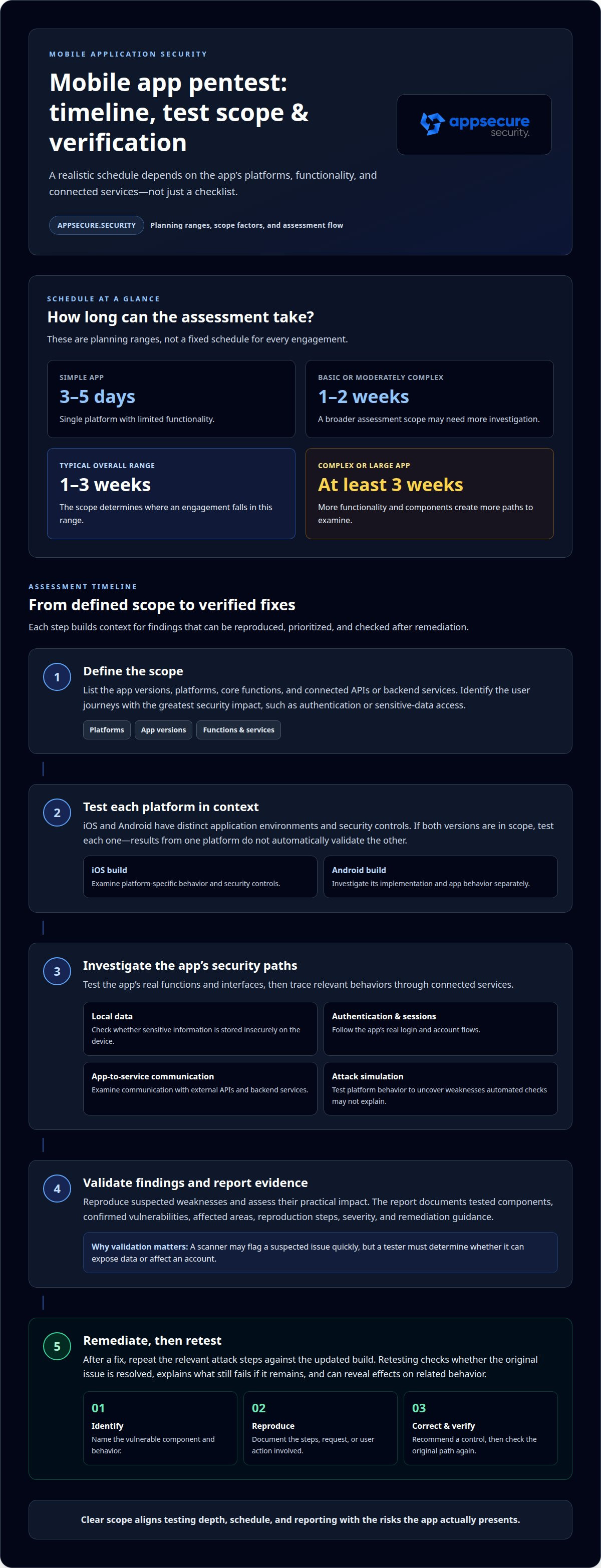
A mobile application pentest can take 3 to 5 days for a simple, single-platform app with limited functionality. A basic or moderately complex assessment typically takes 1 to 2 weeks. Across different scopes, a typical mobile application penetration test takes between 1 and 3 weeks, while a complex or large app can require at least 3 weeks. These timelines are planning ranges, not a fixed schedule for every engagement.
The biggest timing factor is the assessment scope. Testing one app on one platform differs from examining both iOS and Android, multiple app versions, and connected APIs or backend services. Functionality also matters. A focused app with a small set of user journeys takes less investigation than one with complex account roles, payment flows, or sensitive data handling. Each added component creates more paths to examine and validate.
iOS and Android testing use different methodologies because each platform has distinct application environments and security controls. A pentest examines the app in its actual platform context, rather than assuming one platform’s results represent the other. For example, if an app is released on both iOS and Android, each version needs platform-specific testing. Differences in implementation can lead to distinct vulnerabilities, even when the visible features appear identical.
Platform-specific security testing can include checks such as:
• Reviewing how each build stores sensitive information locally, including whether data is left insecure on the device.
• Testing authentication and session behavior through the app’s real login and account flows.
• Examining communication between the mobile app, external APIs, and backend services.
• Simulating attacks against each platform’s app behavior to uncover weaknesses that automated checks may not explain.
These steps affect timelines because findings need to be reproduced and assessed in context. A scanner may flag a suspected issue quickly, but a tester still needs to determine whether it can expose data or affect an account. Testing an iOS build does not automatically validate Android behavior. Each relevant platform and application flow requires its own investigation.
To plan the engagement, define the app versions, platforms, core functions, and connected services in scope. Then identify which user journeys carry the greatest security impact, such as authentication or sensitive-data access. For an app released on iOS and Android, include both builds in the test plan. Clear scope helps align testing depth, schedule, and reporting with the risks the app actually presents.
Assessment process, reporting, and remediation
A mobile application penetration test should deliver a report documenting tested components, confirmed vulnerabilities, and actionable fixes. Retesting can then verify whether remediation resolved each finding or left exploitable risk.
Assessment Process
The assessment begins by defining the application components and behaviors in scope. Testers examine app functions, interfaces, and relevant security controls, then simulate attack paths against them. For example, they may trace how an authenticated action reaches an API and handles sensitive data. This context helps distinguish an exploitable weakness from a tool alert that lacks practical impact.
Testing combines technical analysis with attempts to reproduce suspected weaknesses. Findings are validated before reporting, with evidence showing the affected component and the steps that exposed the issue. That validation gives engineering teams specific points to investigate, rather than a list of unverified alerts.
Risk-Based Reporting and Remediation
A useful report connects each vulnerability to its potential effect. It can prioritize findings by severity, document reproduction steps, identify affected components, and recommend remediation. A flaw that exposes sensitive data through an account flow, for instance, needs a clear explanation of the affected flow and the conditions required to reproduce it.
Remediation guidance should give developers a direct starting point:
• Identify the vulnerable component and the app behavior involved.
• Explain how to reproduce the issue, including the relevant request or user action.
• Recommend a corrective control and describe the risk it addresses.
This structure helps teams triage work by security impact and assign fixes to the right application or API owners. It also gives decision-makers a clear view of unresolved risk.
Remediation Verification and Retesting
After a fix is implemented, retesting checks whether the original attack path still works. Testers repeat the relevant steps against the updated build and record whether the vulnerability was resolved. If the weakness remains, the report can explain what still fails. Retesting can also reveal whether a change affected related behavior, supporting an iterative improvement process.
Verification should stay tied to the original finding. If a fix changes an authentication control, for example, the retest should revisit the affected login or session flow. This produces useful evidence for closing findings and tracking any remaining exposure, rather than relying on a code change alone.
For applications in the Cardholder Data Environment that store, process, or transmit cardholder data, PCI DSS penetration testing requirements apply. The report can document the tested application components and findings relevant to that scope. Clear evidence helps teams connect assessment results with their security and compliance work.
For a mobile assessment with defined reporting and retesting needs, discuss your assessment scope.
Common mobile app vulnerabilities
A mobile app can expose weaknesses in its code, local data, authentication, or server-side behavior. Testers look for vulnerabilities an attacker could exploit, then trace each issue to its real impact.
Attacker-Exploitable Vulnerabilities
A useful assessment distinguishes a theoretical weakness from a practical attack path. For example, a tester may attempt to bypass authentication, access another user’s records, or alter a request before it reaches an API. The key point is whether the weakness lets an attacker compromise data, accounts, or application integrity.
Common findings include insecure local storage, weak authentication, memory leaks, and vulnerable third-party components. A library flaw can affect the app even when its own code appears secure. Testers examine how these issues combine, since a minor exposure can become serious when paired with a weak control.
Direct attacks against a mobile app can also reveal server-side vulnerabilities. A tester may modify an API request to change an account identifier or access a function hidden from the normal interface. If the backend trusts the app to enforce permissions, an attacker may bypass that assumption by sending requests directly. The assessment follows the data and control flow across the app and its connected services.
Insecure storage
Local files or preferences may expose unencrypted information after device access.
Weak authentication
A flawed login or session flow may let attackers reach protected functions.
Memory leaks
Native apps written in C++ or Objective-C can expose sensitive data through memory handling flaws.
Supply-chain weaknesses
Third-party libraries and frameworks can introduce vulnerabilities or malicious code.
Deep-Link, Intent, and IPC Risks
Deep links route users to specific app screens, such as a password-reset page. Testers manipulate link parameters to see whether the app accepts unsafe destinations or actions. On Android, intents pass requests between app components; insecure handling can expose functions or data to unintended callers.
Interprocess communication, or IPC, also deserves scrutiny because apps exchange data with system services and other components. A tester checks what information crosses those boundaries and whether the receiving component validates it. For example, an exported Android component that accepts untrusted input could trigger an unintended action.
The Open Worldwide Application Security Project maintains a knowledge base of mobile application risks, causes, and mitigations. Its categories help organize testing, but release decisions should rely on validated findings in the app’s own code and behavior. Testers reproduce each issue, identify affected components, and explain the attacker’s path so teams can prioritize fixes before release.
What is mobile app penetration testing?
Mobile app penetration testing examines how an app handles code, data, and communication with other systems. A critical focus is whether sensitive information stays protected on the device and in transit.
Insecure Data Storage
Testers inspect where an app stores information, then assess whether another person could access it. For example, cached account details, authentication tokens, or unencrypted records may remain in local files after a user signs out. The assessment also considers insecure cloud storage connected to the app, since exposed data can affect users beyond one device.
Security testing traces data through the app’s lifecycle. A tester can follow a sample account action, identify what gets written to storage, and check whether sensitive values persist after the task ends. The result helps engineering teams distinguish necessary app data from information that should be protected or removed.
Local storage is only one boundary. Inter-application communication can expose information when an app passes data to another component or service. Testers examine these exchanges and verify that the receiving component handles input safely. For instance, an app that shares a session value should not unintentionally make that value available to an unrelated process.
Data transmission deserves the same scrutiny. A tester observes traffic between the app and its APIs, then assesses whether requests and responses expose sensitive information. Integrations with external services also matter: a sign-in flow or payment feature may send data beyond the app’s own backend. Tracing those paths shows where information travels and which controls protect it.
Hardcoded Secrets and Sensitive Data
Testers examine source code or compiled app binaries for embedded credentials, API keys, tokens, and configuration values. A hardcoded secret can give an attacker a path to an API or service if the value remains usable outside the app. The assessment checks whether discovered values grant access, what they expose, and which systems depend on them.
Sensitive-data discovery also covers information included in logs, error messages, and app responses. For example, a failed login should not reveal a token or unnecessary account details. Testers connect each exposure to its location and use, so engineering teams can remove secrets, restrict access, or reduce the data collected.
The Open Worldwide Application Security Project maintains a knowledge base of mobile application risks, causes, and mitigations. Its 2024 OWASP Mobile Top 10 edition can help frame risk categories, while testing confirms how those risks appear in a specific app. Protecting data across storage, communication, and integrations reduces exposure and supports user confidence.
Mobile application penetration testing services
Mobile application penetration testing services combine simulated attacks, technical analysis, and practical remediation guidance. They assess Android, iOS, or cross-platform apps, including their code, platform features, network traffic, APIs, and backend services.
The engagement starts by defining the app versions, platforms, and components in scope. Testers map important user journeys, such as account creation, sign-in, and payment actions, then identify the data and services each journey touches. That map helps focus testing on real attack paths instead of treating the app as an isolated screen.
Analysis can include static and dynamic testing. Static analysis examines source code or compiled binaries without running the app. Dynamic analysis examines an app’s behavior while it is running. Automated tools can process repetitive checks, while manual testers investigate complex logic, chained weaknesses, and findings that require context.
App and platform behavior
Examine how Android and iOS builds implement permissions, authentication, and sensitive actions.
APIs and backend services
Trace requests, responses, and authorization checks between the app and connected systems.
Data handling
Follow information from user input through local storage, network transmission, and server processing.
Third-party components
Review libraries and frameworks that may introduce hidden weaknesses into mobile apps.
Testing the network boundary matters because a mobile interface does not enforce backend security by itself. For example, testers can alter an API request to assess whether the server checks account ownership before returning a record. The same function should be examined through expected app flows and direct requests, so analysis can reveal gaps between client-side controls and server-side authorization.
Source code access can deepen analysis by exposing insecure implementation patterns, while runtime testing shows how those patterns behave in practice. When code is unavailable, testers can still examine the compiled app and observe its behavior. In either case, findings need validation: a report should connect each issue to an affected component, a reproducible attack path, and a remediation step.
The clearest takeaway is to scope the whole mobile environment, not just the app interface. Include relevant builds, APIs, backend services, and third-party dependencies, then align testing depth with the app’s critical user journeys. To define a focused assessment for your app, discuss your mobile testing scope.
AppSecure Security: Mobile Application Penetration Testing
AppSecure Security provides Mobile Application Penetration Testing for teams that need to uncover exploitable weaknesses before release or after major app changes. Its practitioner-led assessments investigate mobile app risks beyond automated checks, helping security and engineering teams understand what an attacker could reach and how to address it.
The Agentic Penetration testing Platform supports testing across mobile and connected environments, including APIs. This can be relevant when an app’s risk extends beyond its device-side code into backend services or integrations. For broader attack-path exercises, Red Teaming as a Service can assess how security weaknesses interact across an organization. Web Application Penetration Testing is also available when mobile journeys rely on a web application.
Make Your Next Release a Deliberate Security Decision
Use the assessment as a planning input, not a box to tick after development is complete. Bring security, mobile engineering, and product owners into the same conversation before the next release. Agree on which risks must be resolved, who owns each change, and how the team will decide that remediation is complete. That alignment turns technical findings into decisions the release team can act on.
The right mobile application penetration testing services should fit the app’s architecture and the business impact of its user journeys. Treat each assessment as a chance to sharpen engineering priorities, challenge assumptions, and make security part of how the product evolves. That discussion can also identify where testing should connect with existing development and remediation workflows. The next step is a focused conversation about your app, its release plans, and the outcomes you need from testing.
Contact AppSecure Security to discuss your mobile application assessment. A clear scope gives your team a stronger starting point for its next security decision.
Frequently Asked Questions
1. Do they have certified and experienced penetration testers?
AppSecure Security’s testing approach is grounded in experienced ethical hackers and bug bounty hunters conducting manual, hacker-led assessments. Practical experience and formal certification are distinct signals: certifications demonstrate structured learning, while hands-on work shows how testers investigate application behavior. Evaluate the testing methodology, evidence behind findings, and remediation guidance to understand how the team’s expertise applies to your mobile app.
2. Do you include a re-test?
Yes. AppSecure Security’s testing deliverables include final re-validation after remediation. Once your team applies a fix, the tester can revisit the affected behavior and determine whether the original issue remains. For example, if a change updates an API authorization check, retesting should examine the same access path. This gives engineers evidence to support closing a finding or deciding what needs further attention.
3. Does their testing process blend manual testing with automated tools?
Yes. AppSecure Security combines manual, hacker-led assessment with automated and intelligent testing through its Agentic Penetration Testing Platform. Automation can help cover repeatable checks across application surfaces, while manual investigation examines context, attack paths, and complex logic. For example, a tool may identify a suspicious API response, and a tester can determine whether it exposes another user’s information.
4. How do you test mobile app security?
Testing examines the app build, its behavior on the device, and the systems it communicates with. Mobile analysis can include static, dynamic, and runtime testing of Android APK and iOS IPA builds. Testers also examine relevant API interactions and authentication flows. For example, they can compare what an app permits through its interface with what its connected service accepts directly.
5. What does runtime testing catch that static analysis doesn’t?
Runtime testing reveals behavior that appears only while an app executes, such as how it handles live input, session state, and server responses. Static analysis can flag risky code patterns without running the app, but it cannot show every consequence in context. For example, runtime analysis can expose a flaw that appears only after a particular user action triggers an API request.
6. Which compliance frameworks does the report map to?
AppSecure’s Agentic Penetration Testing Platform provides compliance-ready exports for SOC 2, ISO 27001, and CERT-In. These exports can support security documentation alongside technical findings. Compliance alignment depends on the engagement’s scope and the evidence relevant to your organization’s requirements. If a mobile assessment supports a specific audit, define the applicable framework and reporting needs as part of scoping.
7. What factors affect mobile application penetration testing pricing and timeline?
Pricing depends on the case and is provided after a quote request. Scope, number of platforms, app functionality, APIs, backend services, and testing depth affect the work involved. Timeline also depends on how many builds and user flows require assessment, plus the complexity of integrations and findings that need validation. A tightly scoped single-platform app differs from an assessment spanning several connected components.
8. What are the differences between manual mobile app penetration testing and automated scanning?
Automated scanning checks for repeatable patterns quickly, while manual testing probes how features behave together and whether weaknesses can be exploited. A scanner might flag an authorization concern; a tester can investigate whether changing a request exposes another account’s records. Used together, automation supports broad, repeatable analysis, and human-led testing adds context, validates impact, and examines business logic.