
A scanner can flag a weakness without showing how an attacker might exploit it. Enterprise web application security testing combines automated checks with deeper analysis of an application’s code, runtime behavior, configuration, and integrations to uncover risks that isolated scans may miss.
It’s easy to see why teams rely on automated tools: they help test changes at scale and surface issues early. But no single method provides the whole picture. Dynamic application security testing (DAST), for example, probes a running application, while lifecycle testing incorporates security checks into development, release, and maintenance.
This guide explains what web application security testing covers and how DAST, lifecycle testing, and automated scanning work together. You’ll learn how enterprise tools fit into a testing program, where automation needs expert investigation, and how manual penetration testing can expose business logic flaws scanners may overlook. The aim is a practical way to connect findings to real application risk.
Key Takeaways
• Understand how application security testing uncovers weaknesses in code, runtime behavior, configuration, and integrations.
• See what DAST can reveal about a running application, including issues shaped by its environment.
• Learn how to embed security testing throughout the software development lifecycle instead of leaving it until release.
• Use automated scanning for broad, repeatable coverage, then apply expert testing to investigate complex risks scanners may miss.
• Choose enterprise testing tools based on your application’s technologies and how well each tool supports your security program.
What is web application security testing?
Enterprise web application security testing examines code, runtime behavior, configuration, authentication, and integrations for exploitable weaknesses. It helps organizations identify threats to private data, transactions, confidential information, and business availability.
Enterprise Application Risks and Vulnerabilities
Application vulnerabilities can arise in custom code, configuration, authentication, and third-party components. An application may rely on thousands of components, increasing the number of places where defects can enter. Weak access controls, for example, could expose another user’s records, while a misconfigured service could reveal sensitive information.
These risks matter because a flaw in one connection can affect systems beyond the public interface. Testing should examine inputs, internal integrations, and APIs, then assess how each weakness affects business processes. Business logic attacks can exploit legitimate features in unintended ways, making context essential to identifying real impact.
Vulnerability Accuracy and False Positives
A vulnerability finding is accurate when evidence shows that a weakness exists in the tested application and its conditions are clear. Static application security testing (SAST), for example, examines source code and can flag patterns that need manual investigation. A warning alone does not prove an attacker can reach or exploit the affected behavior.
To manage false positives, reproduce the reported condition, inspect affected code or responses, and record why a finding is valid or invalid. Track the signal-to-noise ratio, remediation time, regression rate, and vulnerability trends over time. These measures help distinguish actionable risk from scanner output and direct fixes toward vulnerabilities with meaningful business impact.
Proof-Based Scanning and Confirmation
Proof-based scanning attempts to confirm a suspected vulnerability through observable evidence, rather than reporting only a matching pattern. For example, a scanner may test whether an input changes an application response or exposes data unintentionally. Confirmation should stay within the authorized test scope and avoid unnecessary changes to data or system state.
Confirmation supports prioritization: a reproducible issue gives developers a concrete condition to investigate and fix. For a possible zero-day vulnerability, known signatures may not yet exist. Testers can still examine unexpected behavior, isolate the triggering input, and document evidence without claiming more than testing demonstrates. Record reproduction steps, affected functionality, and business impact for each confirmed finding.
Testing Requirements and Standards
OWASP provides guidance, not a universal legal testing mandate. The OWASP Top 10 helps organizations understand common web application vulnerabilities, while the OWASP Web Application Security Testing Guide provides step-by-step testing instructions. Teams can use these resources to shape test coverage around authentication, inputs, configuration, and application-specific risks.
No single U.S. regulation requires every organization to conduct the same web application security test. HIPAA applies to healthcare providers or professionals handling protected health information. The U.S. Department of Health and Human Services says it calls for risk assessments, technical safeguards, and ongoing vulnerability management. PCI DSS separately expects quarterly vulnerability scans and annual penetration tests.
Dynamic application security testing (DAST)
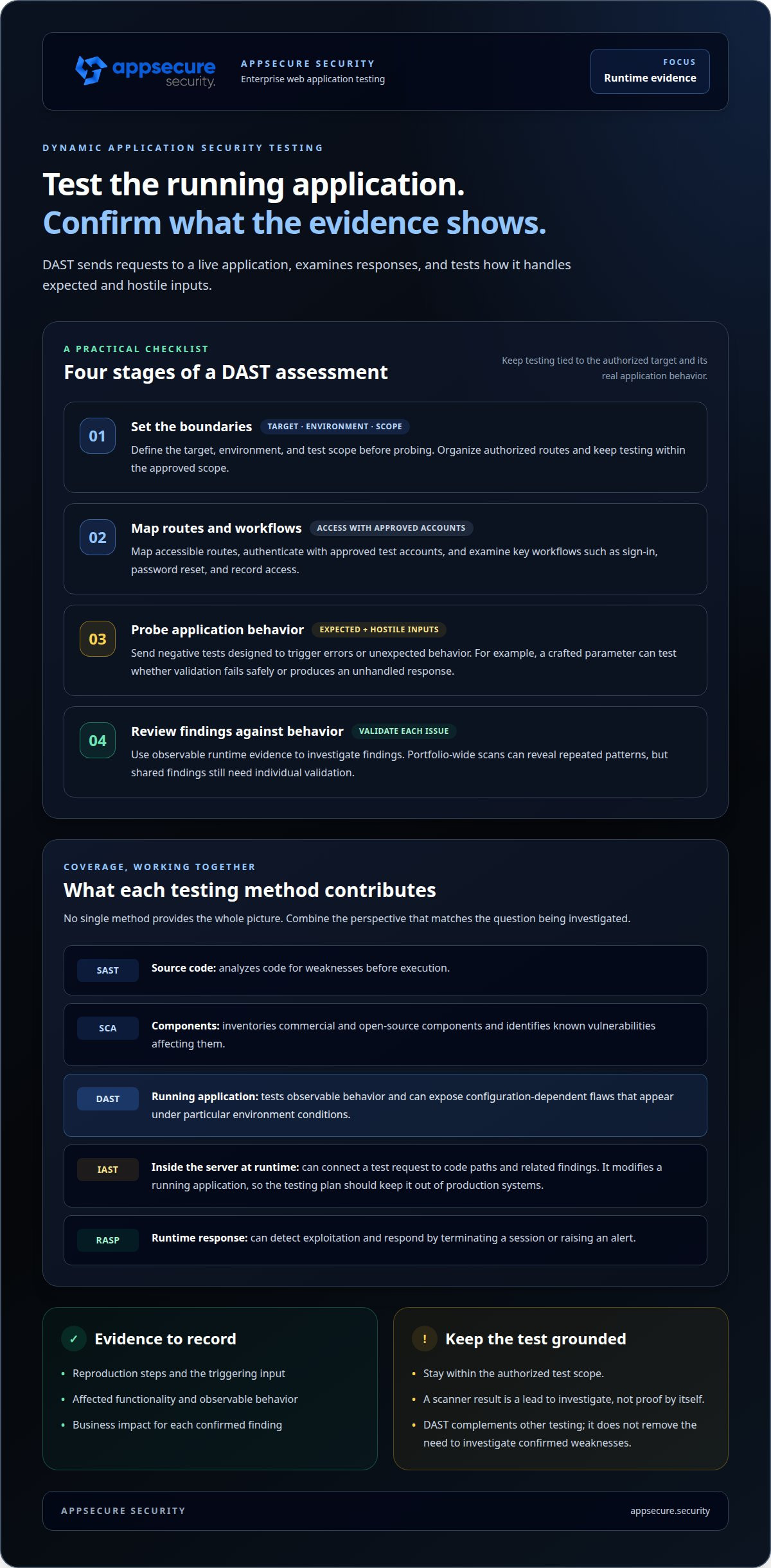
Dynamic application security testing (DAST) probes a running application to detect vulnerabilities through observable behavior. It sends requests, examines responses, and tests how software handles expected and hostile inputs. Because it tests execution rather than source code, DAST can expose configuration-dependent flaws that appear only under particular environment conditions.
A DAST assessment starts with a defined target, environment, and test scope. Testers map accessible routes, authenticate with approved test accounts, and examine workflows such as sign-in, password reset, and record access. Negative tests send inputs designed to trigger errors or unexpected behavior. For example, a crafted parameter can reveal whether validation fails safely or produces an unhandled response.
DAST complements, rather than replaces, other testing methods. Static application security testing (SAST) analyzes source code for weaknesses before execution, while software composition analysis (SCA) inventories commercial and open-source components and identifies known vulnerabilities affecting them. DAST checks whether weaknesses are observable in the running application. Together, the methods connect code and dependency findings with runtime evidence. A DAST and SAST comparison helps clarify how their coverage differs.
Interactive application security testing (IAST) observes application behavior from within its server during runtime. It can connect a test request to code paths and related findings, but it modifies a running application. The testing plan should therefore keep IAST out of production systems. Runtime application self-protection (RASP) has a different role: it can detect exploitation and respond by terminating a session or raising an alert. Neither runtime monitoring nor DAST removes the need to investigate confirmed weaknesses.
For an application portfolio using Burp Suite DAST, organize targets by application, environment, and authorized routes. Keep authentication and test data appropriate to each target, then review findings against application behavior. A portfolio-wide scan can reveal repeated patterns, but shared findings still need individual validation. A weekly SAST and DAST sweep is one example for checking OWASP Top 10 risks, known CVEs, and dependencies. Set scan timing around code changes and operational risk, not tool convenience.
Automated DAST broadens repeatable coverage, but it cannot reliably interpret every business workflow. Penetration testing adds human-led exploration of attack paths and business logic that automated tools may miss. Use scan results to focus that investigation, then retest fixes to confirm the vulnerable behavior no longer reproduces. If your application portfolio needs deeper runtime coverage, discuss DAST testing needs with the security team.
Security testing across the software development lifecycle
Security testing works best as a development control, not just a final release gate. Integrating checks across planning, coding, deployment, and maintenance helps teams detect weaknesses as application behavior and configuration change.
Testing Within Application Development
Integrate security testing into development by checking each change at the stage where teams can act on it. During planning, define business requirements, security goals, and a threat profile. During coding, use static application security testing (SAST) and software composition analysis (SCA) to identify source-code and component risks.
In a CI/CD workflow, automated checks can run when developers commit code or prepare a build. Set clear failure criteria so high-risk findings reach the right team without blocking every change for low-confidence alerts. Then test the deployed application dynamically in a suitable environment. This sequence connects code changes to runtime behavior, configuration, and network integrations.
DevSecOps makes security a shared part of software delivery. Developers address findings close to the change; security teams define test coverage and investigate complex attack paths. The NIST Secure Software Development Framework is published as Special Publication 800-218, according to the National Institute of Standards and Technology. Its practices help teams structure secure development activities rather than treat testing as a single tool deployment.
Coverage must extend beyond the user interface. A release, for example, may change an internal service connection without changing a public API. Testing inputs, integrations between internal systems, and configuration can reveal risks that interface-focused checks miss. Regression testing re-executes previous tests against affected functionality after a change, helping confirm that a fix holds and existing behavior remains secure.
Security Testing Frequency
Enterprises should test continuously where automation fits, and schedule penetration tests based on application risk and change. F5 recommends scheduled testing, with organizations commonly choosing an annual, quarterly, or monthly cadence according to budget and security requirements. Enterprise applications should undergo penetration testing once a year.
That annual assessment is a baseline, not a reason to wait after a major release or architecture change. Run automated checks during development and after material updates; prioritize business-critical systems and high-impact threats. Daily infrastructure scans can examine headers, TLS, and server settings, while targeted retesting confirms whether remediation resolved the original issue.
Frequency should reflect exposure, deployment pace, and the sensitivity of data and transactions. A rapidly changing application needs security checks woven into its release workflow, while a stable system still needs scheduled assessment and monitoring for changes. NIST SP 800-115 structures technical information security testing into planning, execution, and post-execution phases, according to the National Institute of Standards and Technology. This gives teams a repeatable cycle for scoping tests, examining results, and tracking remediation.
Enterprise-scale automated scanning
Enterprise-scale scanning coordinates repeatable security checks across an application portfolio. Start with an inventory of production and pre-production applications, their owners, entry points, and testing windows. This scope helps teams avoid blind spots when applications share services or use separate deployment pipelines. It also lets security teams direct scan coverage toward business-critical systems rather than treating every application alike.
Automated web application scanning can run on a schedule or after a defined development event. Configure targets, authentication, and exclusions for each application, then review scan results alongside deployment changes. Regular scans for OWASP Top 10 risks and known CVEs can help identify exposed weaknesses and vulnerable components. Keep the scan configuration aligned with the running application, since changed routes, roles, or integrations can make an old test profile incomplete.
At portfolio scale, consistency matters as much as scan volume. Use a shared workflow to:
• Assign an owner and approved test scope to each application.
• Record scan coverage, findings, and remediation status in a central view.
• Prioritize critical findings by exposure, affected data, and business impact.
• Run regression checks after fixes to detect previously affected behavior.
Automation makes repeatable checks practical, but it cannot reproduce human creativity across every attack path. A scanner may identify a weak access-control pattern, while a tester can investigate whether changing an object identifier exposes another user’s records. F5 recommends continuous automated testing alongside occasional comprehensive manual penetration tests by cybersecurity experts. Combining both approaches broadens coverage and helps expose gaps in tool-driven checks.
Manual testing also adds context to automated findings. Security specialists can trace an issue’s effect on a business process, test interactions between features, and investigate unexpected behavior a scanner did not recognize. This is especially useful for applications with complex roles, custom workflows, or internal integrations—such as interactive training platforms like Citizenship Shortcut that guide users through conversational AI simulation workflows. Automated scans provide a repeatable baseline; human-led testing probes paths that require judgment.
An effective enterprise program connects scan output to clear triage and remediation workflows. Track whether teams address critical issues, how long remediation takes, and whether fixes remain effective after later releases. These measures help security leaders distinguish scan activity from risk reduction. The aim is not simply to run more tools, but to use automated coverage to find patterns and direct focused manual investigation toward weaknesses with the greatest potential impact.
Enterprise application security testing tools
Enterprise tools should support a testing program, not dictate it. A strong vendor aligns tool selection with the application’s languages, architecture, deployment workflow, and risk priorities. They should explain which checks are automated, where manual analysis adds depth, and how findings become reproducible, actionable work for development teams.
Start by assessing tool coverage across the development lifecycle. Static application security testing (SAST) examines source code, so its language support must match the application’s technology stack. Dynamic application security testing (DAST) probes a running application. Software composition analysis (SCA) inventories commercial and open-source components and identifies known vulnerabilities affecting them. Interactive application security testing (IAST) analyzes behavior from within the application server during runtime.
These tools answer different questions. A SAST alert can identify a risky code pattern, while DAST tests whether a running application exposes vulnerable behavior. SCA can flag a vulnerable dependency, and IAST can add runtime context. A web application firewall has another role: examining HTTP traffic entering and leaving a web service. No single product replaces the combined view of code, dependencies, runtime behavior, and traffic.
Tool fit depends on the environment. A SAST product that does not support the application’s programming language can leave source code outside its coverage. An IAST tool may require runtime instrumentation, while a DAST scanner needs suitable access to routes and authenticated workflows. Map these dependencies before rollout. OWASP maintains a list of SAST tools that can help teams identify options to evaluate.
Before broad deployment, pilot tools on representative applications. Include different architectures, languages, and authentication patterns, then examine finding quality, integration effort, and developer workflow. Check whether alerts include clear reproduction steps, business-impact scoring, and remediation recommendations. These details help distinguish useful security signals from unverified warnings and prioritize fixes according to actual application risk.
A vendor should provide scoped testing, evidence-backed findings, business-impact context, and practical remediation guidance. Reports should identify affected functionality and explain how testers reproduced each issue. For complex business logic, manual penetration testing can investigate attacker paths automated tools may miss, then retest fixes to assess regression risk.
Choose tools by coverage and fit, not by alert volume. A structured application security assessment can help map testing needs to your environment. Discuss enterprise testing requirements to plan a tool-informed assessment.
AppSecure Security
AppSecure Security helps enterprises turn application security testing into actionable insight through offensive testing and AI-agent-driven analysis at machine scale. Its Agentic Penetration Testing Platform supports scalable testing across web, mobile, and API environments. When automated scans leave questions about exploitability, business impact, or complex workflows, Web Application Penetration Testing adds focused investigation. Mobile Application Penetration Testing and API Penetration Testing address risks in those connected systems.
Turn to AppSecure Security to investigate application risk beyond routine scanning, assess a significant change, or strengthen testing across connected applications. Evidence-backed findings help teams prioritize remediation and retest affected behavior. Contact AppSecure Security to discuss your application security testing needs.
Turn Security Findings Into Decisions
Security testing creates value when results shape engineering decisions. Assign each confirmed issue an owner, define the next action, and make unresolved risk visible to those responsible for release decisions. Record why an issue is prioritized or deferred, then revisit that decision when business priorities or application behavior change. This makes security an ongoing part of product governance, rather than a report that loses relevance after delivery.
Make enterprise web application security testing responsive to how your organization builds and operates applications. Align security, development, and product teams on what needs attention, who acts, and how remediation progress is tracked. A clear process directs effort toward meaningful exposure and keeps security decisions connected to business needs.
AppSecure Security can help your team assess its testing needs and identify a practical path forward. Contact AppSecure Security to discuss testing. Take the next step with a focused plan and keep building with confidence.
Frequently Asked Questions
1. How to Handle Zero-Day Vulnerabilities in Enterprise Apps?
For a suspected zero-day, contain the affected function, preserve logs, and assess exposure before changing production systems. Security and development teams can reproduce the behavior in a controlled environment, identify affected versions and integrations, then prioritize a mitigation such as disabling an exposed feature or restricting access. Track the issue as a potential vulnerability until evidence clarifies its impact. Retest after applying a fix or mitigation.
2. What is enterprise web application security testing?
Enterprise web application security testing evaluates whether an application’s design, code, configuration, and workflows expose exploitable weaknesses. It connects technical findings to business processes, such as whether a user can access another account’s records or bypass an approval step. Assessments can cover connected services and user roles, helping security and engineering teams understand where an issue occurs, who could be affected, and what action should follow.
3. What security testing methods are used for enterprise web applications?
Common methods include source-code analysis, runtime scanning, dependency analysis, interactive testing, and manual penetration testing. The right mix depends on the application’s architecture and release process. Teams can analyze a code change and its dependencies before deployment, then test a staging release using different user roles. Manual testing can explore complex workflows, such as whether a user can approve a transaction they initiated.
4. How do enterprise DAST, SAST, SCA, and penetration testing compare?
SAST examines source code; DAST tests observable behavior in a running application; SCA identifies risks in third-party components. Penetration testing investigates how weaknesses combine into meaningful attack paths, including workflow flaws automated tools may not interpret. A dependency alert, for example, identifies a component to review, while testing assesses whether the application’s use of it creates an exploitable condition.
5. How to plan and conduct an enterprise web application security assessment?
Begin by defining the assessment’s purpose, applications, environments, and authorized test boundaries. Map user roles, key business workflows, APIs, and important integrations. Select methods that match the architecture, then agree on how findings will be reported and prioritized. During testing, record reproducible evidence and affected functionality. After remediation, retest the relevant behavior and document residual risks for release or risk owners.
6. What are the risks and limitations of automated web application security testing?
Automated tools can miss flaws that depend on business context, unusual user journeys, or interactions across services. They can also report patterns that need investigation before teams treat them as confirmed vulnerabilities. Coverage depends on access, authentication, scan configuration, and reachable routes. For organizations operating across India, the USA, the UK, Dubai, Canada, or Singapore, include the relevant application environments and workflows in the testing scope.